iPhone and iPad
On iPhone and iPad, Nannavista runs either as a station or as a viewer. You choose each time you open the app:
- Station: the device stays near your sleeping child or pet. It sends what its camera and microphone pick up to its paired viewers.
- Viewer: the device stays with you. It shows the station's picture, plays its sound and sounds an alarm when the connection is interrupted.
The same device can be a station one night and a viewer the next.
What you need
- Two iPhones or iPads with iOS 26 or iPadOS 26 or later: one as the station, one as the viewer.
- A charger for the station, so it runs all night.
- Both devices next to each other once, to pair them.
What is free
Watching a station on the same Wi-Fi is free, for as many nights as you like. To watch a station that is not on the same Wi-Fi, for example from a hotel restaurant, there is the one-time purchase Watch From Anywhere. Watching on an Apple Watch is a separate one-time purchase; see Apple Watch.
The first screen
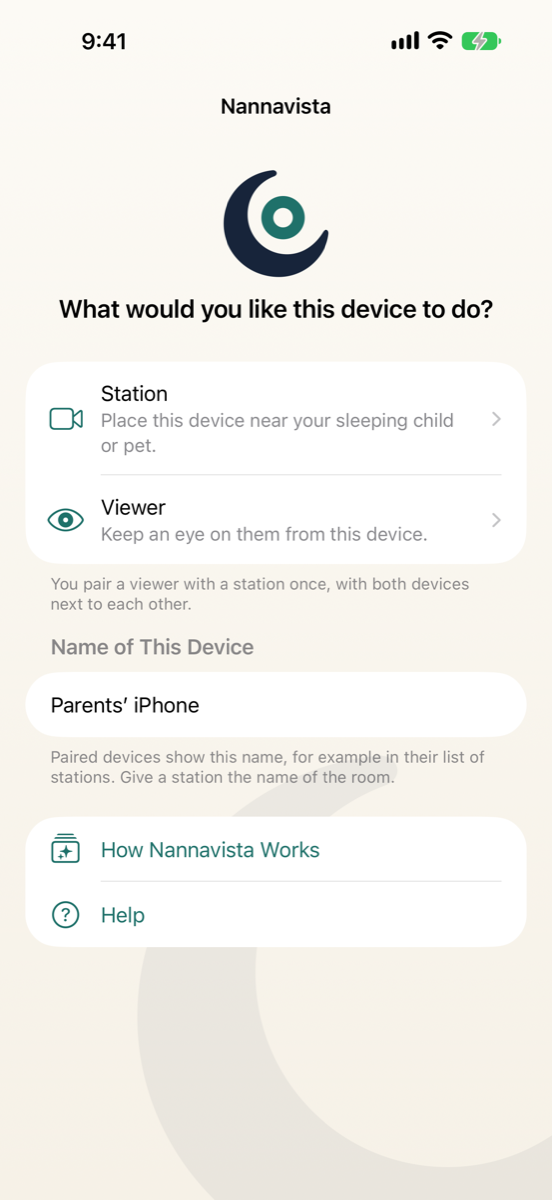
Opening Nannavista shows:
- Station and Viewer, to start the device in that role.
- Name of This Device: paired devices show this name, for example in their list of stations. Give a station the name of the room, such as "Nursery".
- How Nannavista Works: the short introduction shown at the first launch.
- Help: opens this website.
The first time you tap Station or Viewer, Nannavista explains that station and viewer connect directly on the same Wi-Fi. Tap Continue; iOS then asks whether Nannavista may find devices on your local network. Allow it, so the devices can connect.
Next steps
- Set up your first station and viewer.
- Read when the alarm sounds and make sure the alarm reaches you before you rely on Nannavista at night.