Watch a station
Tap a station in the list. The first time, the watch asks for the one-time "Apple Watch" purchase; Restore Purchase brings back a purchase made before, for example on another Apple Watch or by a family member. The watch then says Purchase Restored, No Purchase Found or Couldn't Restore Purchase, so you know whether to try again.
The first time you watch, the watch explains why Nannavista needs notifications and then asks for them; see make sure the alarm reaches you.
While the watch connects to the station, it shows Connecting….

The picture from the station fills the whole screen. It is refreshed every 2 seconds by default; you can change this in Settings. When the station sends sound only, the watch shows a waveform and Sound Only instead.
Turn the Digital Crown to change the volume.
Show the controls
Tap the picture to show the controls. They hide again after a few seconds.
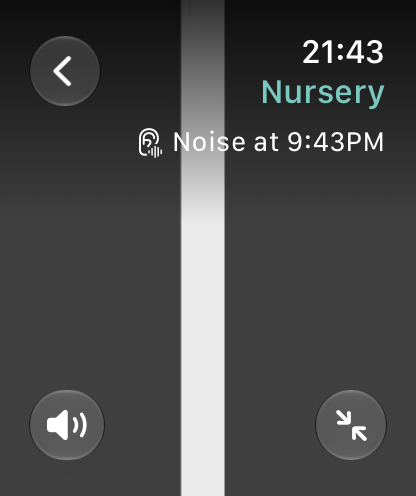
- At the top: the back button, the station's name, Station with the station's battery, and Noise at the time the station last heard a noise.
- Turn Sound Off, bottom left, mutes the station; the watch keeps watching and the alarm still works.
- Show Whole Picture, bottom right, shows the whole picture instead of filling the screen, which crops it at the sides. Fill Screen switches back.
Warnings
The watch shows a status above the picture only when something is wrong:
- Interrupted for a time: the connection dropped, and the watch is trying to reconnect.
- Station not reachable: the connection dropped and the station can't be reached.
- Too many viewers: the connection dropped and as many devices are watching the station as it allows.
- Station paused: Nannavista on the station is in the background, so the station sends no picture and no sound.
- Microphone off at the station: the sound is turned off at the station, or Nannavista isn't allowed to use the microphone there.
- Sound was interrupted. It plays again when it can.: watchOS ended the sound, for example for a phone call. See when watching continues and when it stops.
- Station battery low when the station's battery is below 20 percent and it is not charging.
- Apple Watch battery low when the watch's own battery is below 20 percent.
- Alarm may not reach you: notifications are off, so the alarm can't reach you while Nannavista is not open. Tap it to see how to turn them on.
- Critical Alerts off: you turned off Critical Alerts for Nannavista, so the alarm can't sound in silent mode. Tap it to see how to turn them on.
With your wrist down
When the display dims with Always On, the station's picture stays on the screen, so that a glance shows whether your child is asleep. The status then counts in whole minutes, as the dimmed display updates only about once a minute: Interrupted in the first minute, then Interrupted for and the minutes.
When the connection is interrupted
The watch notices within a few seconds when the connection drops, shows Interrupted for and keeps trying to reconnect. A paused station counts as well.
- After 20 seconds, the watch sounds an alarm for 10 seconds and taps your wrist every 3 seconds, also in silent mode. Tap Silence Alarm to quiet it.
- After 1 minute, it sounds the alarm again.
- After 2 minutes, the watch stops watching and sounds a last alarm. This one keeps ringing and tapping until you tap Silence Alarm. Then the watch shows Stopped Watching; tap Watch Again to watch the station again.
While Nannavista is open, the watch rings the alarm itself and shows no notification for it. With VoiceOver on, the watch also announces each alarm.
When the connection comes back before the 2 minutes are up, the alarm stops. After the 2 minutes, the watch no longer tries to reach the station, so it doesn't notice when the station comes back. The alarm can't be turned off.
If watchOS suspended Nannavista, the alarm arrives as a notification instead, for example Nursery Interrupted. The last one says that Nannavista stopped watching; it sounds once. When you open Nannavista afterwards, it shows Stopped Watching.
When the watch can't connect
If the station doesn't answer, the watch shows Station Not Reachable instead of Connecting…. Make sure Nannavista is open on the station and it is connected to the internet. The watch keeps trying for 2 minutes and shows the picture as soon as the station answers.
If the station doesn't answer within those 2 minutes, the watch stops trying, so that it doesn't drain its battery. It shows Stopped Watching, without an alarm, as the station was never live; tap Watch Again once the station runs.
Too Many Viewers means that as many devices are watching the station as it allows. Close Nannavista on another device. The watch keeps trying for 2 minutes and shows the picture as soon as there is room. If there is still no room after that, it stops and says so; tap Watch Again to try once more. If this happens while you are watching, it counts as an interruption, and the alarm sounds as usual.
Can't Watch means the station removed this Apple Watch. To watch it again, add it again on the station. Tap Remove Station to remove it from the watch as well, or Try Again if it was added again in the meantime.
Can't Connect comes with a reason and Try Again:
- Check that your Apple Watch is connected to the internet.
- Nannavista needs to play sound to connect. Stop music or anything else that's playing and try again.
- Connect your headphones, or turn off Listen with Headphones in Settings.: you closed the request for headphones; see Settings.
Stop watching
Go back to the station list, or pause in Now Playing. Either stops the sound and the connection. After a pause in Now Playing, the watch shows Stopped Watching with Paused in Now Playing.; tap Watch Again to continue. Read when watching continues and when it stops.